The short answer
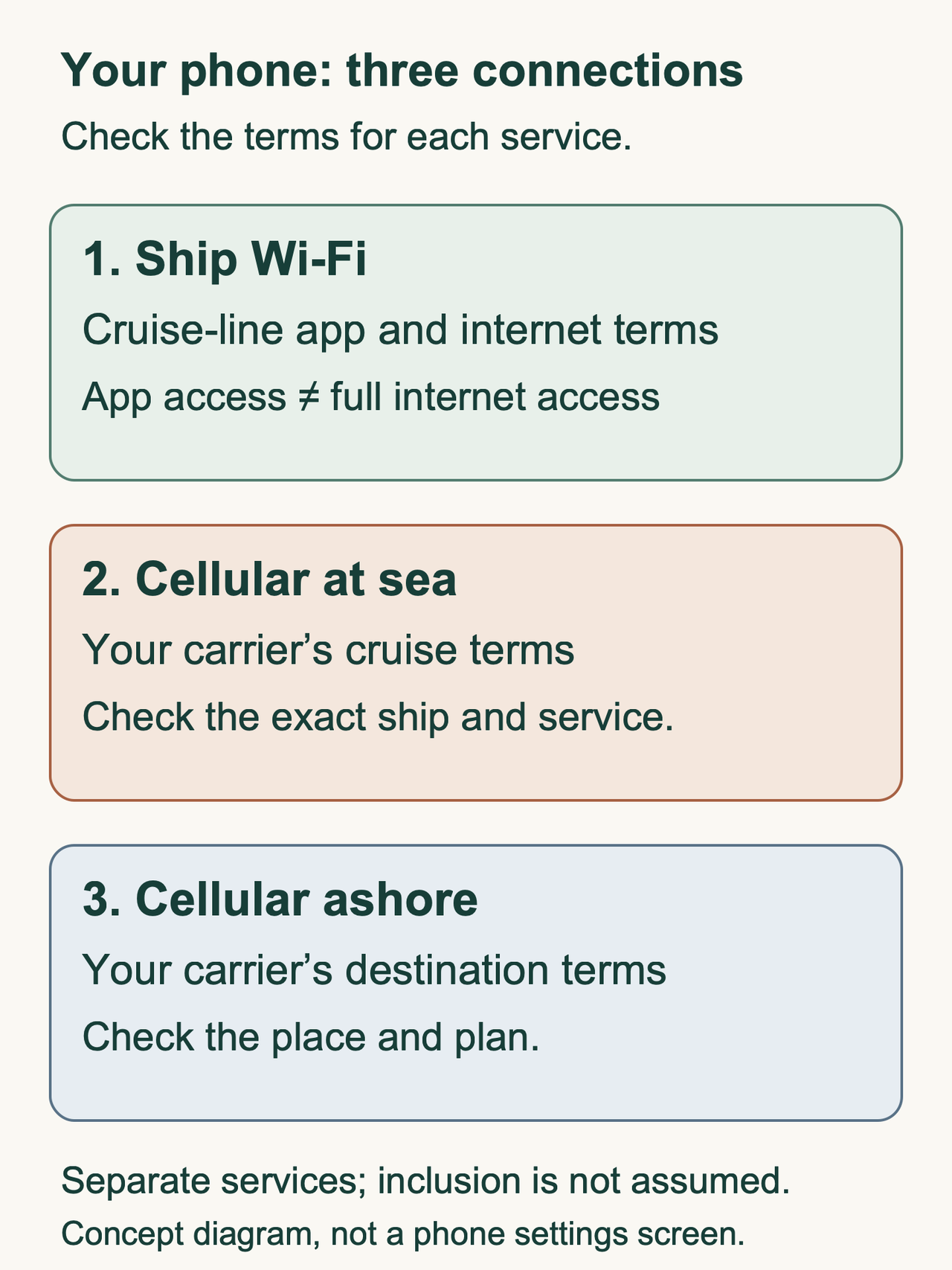
A cruise phone can connect by maritime cellular at sea, local cellular in port, or the ship’s Wi-Fi. These are different services with different terms. If you want to avoid maritime cellular use, check the exact ship’s guidance with your cruise line and carrier, then confirm your phone settings; airplane mode can be used with Wi-Fi on supported devices, but no setting here guarantees zero charges or a particular service.
In this guide
- Which connection is my phone using?
- What should I check with my carrier before sailing?
- How do airplane mode and ship Wi-Fi fit together?
- What is a device-specific setup routine?
- Does ship Wi-Fi include the cruise-line app?
- What should I save offline before leaving?
- Who can answer questions about my exact plan or setting?
- Common questions
- Sources and scope
Which connection is my phone using?
Separate three connections before deciding what to switch on. Royal Caribbean says its ships can offer cellular-at-sea service and that the guest’s carrier determines its roaming rates; it presents VOOM Wi-Fi as another way to connect. At a port, check your carrier’s destination-country coverage and terms rather than assuming a ship plan or domestic package covers the local network.
Scroll sideways if you need to see more columns.
| Connection | What it is | What to verify |
|---|---|---|
| Cellular at sea | Maritime mobile service on a participating ship | Exact vessel eligibility, carrier terms and what events count as use |
| Cellular in port | Local land-based mobile service, depending on location and account | Destination coverage and current carrier terms for the country |
| Ship Wi-Fi | The ship’s wireless network; internet access may require a separate plan | Line’s app access, plan features, device/login rules and purchase terms |
What should I check with my carrier before sailing?
Ask about the exact vessel and distinguish maritime cellular from land roaming. Royal Caribbean says ship cellular rates are set by the cellular provider. AT&T publishes a participating-vessel list, but warns that participation can change and that coverage availability, quality, technology and maritime services are not guaranteed. That is an AT&T example, not a statement about another carrier’s plan or your eligibility.
AT&T’s current International Day Pass guidance is a carrier-specific example: it separates included land/air destinations from participating ships at sea, and says its own daily fee can be triggered by making or receiving a call, sending a text, or using data, including background activity. It explicitly says incoming text messages do not trigger the daily fee. Its instructions for avoiding unintended use include airplane mode plus Wi-Fi, turning off Wi-Fi Calling and checking background apps. Do not apply those settings or terms to a different carrier/account without checking that provider’s instructions.
- Is this exact ship on the carrier’s current cruise list?
- Does the plan apply at sea, in port, or both?
- Which calls, texts, data or background activity can count under my plan?
- What are the current rates, limits, activation rules and ways to prevent maritime use?
- What terms apply in each country on my itinerary?
How do airplane mode and ship Wi-Fi fit together?
Follow your cruise line’s current steps. Carnival’s internet guidance says to turn on airplane mode once on board and then connect to Carnival Wi-Fi. That is a Carnival-specific procedure; it is not a universal guarantee that every device, plan or radio setting prevents all charges. Confirm your own carrier’s instructions before relying on a setting to control billing.
Airplane mode and Wi-Fi are distinct controls on the device makers’ documented examples below. Apple explains that Wi-Fi can be used while Airplane Mode is on. Google Pixel support says Wi-Fi and Bluetooth turn off the first time Airplane Mode is enabled, and that the phone remembers the previous state. Interfaces and behavior vary across devices, versions and manufacturers.
Scroll sideways if you need to see more columns.
| Device example | Manufacturer guidance | Practical next step |
|---|---|---|
| iPhone/iPad | Apple: Airplane Mode turns off cellular and Wi-Fi; Wi-Fi can be used while Airplane Mode is on. | Before sailing, find Control Center and the separate Wi-Fi control; on board follow your line’s directions. |
| Google Pixel | Google: first Airplane Mode activation turns Wi-Fi/Bluetooth off; Pixel remembers prior wireless state. | Check Settings > Network & internet > Internet > Wi-Fi after enabling Airplane Mode; confirm status. Pixel-specific path. |
| Other Android models | The Pixel steps do not establish identical menus or behavior on every Android device. | Use the exact phone maker’s support page and check settings on your model/version. |
What is a device-specific setup routine?
Use this as a preparation checklist, not a promise about costs: confirm the line/carrier instructions first, learn where the device control is, then look at the current phone status after making changes. AT&T’s guidance for its own International Day Pass mentions airplane mode plus Wi-Fi, disabling Wi-Fi Calling and checking background apps to avoid unintended use; this is carrier-specific and is not a universal zero-charge recipe. If the device behaves differently than expected, stop and contact the carrier or cruise line before using the connection. Do not assume that switching off mobile data also disables every voice, text or roaming feature.
Does ship Wi-Fi include the cruise-line app?
It depends on the operator and app features. Carnival says the HUB app works on airplane mode with the ship’s Wi-Fi without buying an internet plan; its FAQ also distinguishes onboard app functions and chat. Do not transfer that policy to another cruise line. If your goal is general web access, streaming or calls, compare the line’s internet packages separately in the cruise Wi-Fi buying guide.
What should I save offline before leaving?
Save booking and port details, hotel/transfer addresses, excursion meeting information and the day’s plan in a form you can open without a connection. If you plan to use an app, install and sign in before departure, then check what remains available offline. Agree on a simple meeting point and time with travel companions in case messaging is unavailable; these are planning suggestions, not guarantees about connectivity. For the rest of your first-sailing preparation, use the first cruise guide.
- Download maps, tickets and entertainment you plan to use offline.
- Save carrier and cruise-line support contacts and plan terms.
- Keep essential booking and excursion details available outside a live app session.
- Agree on a fallback meeting point and time with companions.
Who can answer questions about my exact plan or setting?
If a phone setting, carrier plan or ship instruction is unclear, contact the mobile provider or cruise line with the actual phone model, OS version, ship and sailing details. Ask the provider to distinguish cellular-at-sea use from land roaming and ship Wi-Fi, and request instructions for your exact account. This guide does not determine account charges or guarantee emergency contact or connectivity.
- Ask the mobile provider about the exact vessel, countries and service events covered by the account.
- Ask the cruise line which network/app features are included and where its current ship instructions are posted.
- Keep the provider’s written answer and terms available offline.
Common questions
Should I put my phone in airplane mode on a cruise?
Use the cruise line’s current instructions and ask your carrier how to prevent unwanted maritime use. Carnival tells guests to use airplane mode and then connect to its Wi-Fi; that example does not establish another line’s procedure or guarantee zero charges.
Sources [5]
Can I turn Wi-Fi back on while airplane mode is on?
Apple says Wi-Fi can be used in Airplane Mode. Google Pixel support says Wi-Fi initially turns off when Airplane Mode is enabled and can be turned back on; Pixel remembers the prior wireless state. Check your exact model and cruise-line instructions.
Will my international roaming package cover the ship?
Do not assume it does. Royal Caribbean says cellular-at-sea rates are set by the mobile provider. AT&T’s current International Day Pass guidance distinguishes participating ships at sea from included land destinations; exact coverage and account terms are carrier-specific. Ask your provider about your ship and itinerary.
Can I use a cruise-line app without buying internet?
Carnival says its HUB app works with airplane mode and the ship’s Wi-Fi without an internet purchase. This is Carnival-specific; check the app and plan terms for your line.
Sources [4]
Sources and scope
Check the current terms for your ship, sailing and booking. This guide combines published source material with planning suggestions; it does not claim firsthand travel experience.
- Use Airplane Mode on your iPhone, iPad, Apple Watch, and Apple Vision ProSource checked 2026-10-21.
Apple explains that Airplane Mode turns off radios except Bluetooth on iPhone/iPad/Vision Pro, and Wi-Fi can be used while Airplane Mode is on. Page published 2026-02-11; exact controls/behavior should be checked on the user’s device.
- AT&T Cruise Ship GuideSource checked 2026-10-21.
AT&T publishes a participating cruise/ferry vessel list and warns that participants can change without notice and availability, coverage quality, technology and maritime-roaming services are not guaranteed. No rates are repeated.
- Get Details About AT&T International Day PassSource checked 2026-10-21.
AT&T explains its specific International Day Pass applies on included destinations, participating airlines and cruise ships; it separates land/air from at-sea use and says its own fee may be triggered by talk/text/data, including background data. It advises airplane mode plus Wi-Fi to avoid unintended data use in included destinations, turn off Wi-Fi Calling, and check background apps. All pricing omitted; instructions are AT&T-specific.
- Carnival HUB AppSource checked 2026-10-21.
Carnival describes HUB features, device requirements, and says the app works in airplane mode with ship Wi-Fi without an internet purchase; chat has an additional fee (not repeated here).
- Internet Plans | Wi-Fi Plans & PricesSource checked 2026-10-21.
Carnival’s live official page describes Social, Value and Premium features, one device at a time, switching among multiple devices per plan, satellite speed variability, unsupported VPN, pre-purchase timing, onboard daily plans, and no refund after onboard activation. No prices are repeated.
- Keep your Android’s wireless connections on in Airplane modeSource checked 2026-10-21.
Google Pixel support says first activating Airplane Mode turns off Wi-Fi and Bluetooth, the remembered state applies on next activation, and Wi-Fi can be turned on in Settings > Network & internet > Internet. Pixel-specific instructions, some steps Android 11+.
- Will my phone work onboard a cruise ship?Source checked 2026-10-21.
Royal Caribbean says its ships provide cellular-at-sea connectivity, roaming rates are determined by the guest’s cellular provider, and VOOM Wi-Fi is another connection option. Royal Caribbean-specific example.