The short answer
Start with what you need to do online, then compare the services and device rules on your exact sailing. Carnival’s current Social, Value and Premium descriptions illustrate how tiers can differ, but plan names and terms are line-specific. Carnival says only one device can connect at a time, while multiple devices can be used on a plan sequentially; confirm the actual offer and quote in your booking before purchase.
In this guide
- What do you need the connection to do?
- How do Carnival’s current tiers compare?
- Can I use one plan on more than one device?
- What limits should I check before buying?
- When and where can I buy the plan?
- What should I compare before I choose?
- How is cruise Wi-Fi different from phone roaming?
- Common questions
- Sources and scope
What do you need the connection to do?
List the tasks you expect to use at sea: messaging, email, web browsing, streaming, or voice/video calls. Check whether the apps you rely on are included and whether any limit matters to you. A tier name such as ‘social’ or ‘premium’ is not a standard across cruise lines.
Carnival is a concrete current example: its Social plan lists selected social and messaging apps, Value adds general browsing and email, and Premium lists streaming and video-call support where coverage allows. Use the service list for your own ship and date; do not choose from a plan name alone.
- Write down must-have apps and tasks before comparing tiers.
- Download films, maps, tickets and documents for offline use before sailing.
Sources [1]
How do Carnival’s current tiers compare?
This comparison summarizes Carnival’s live page checked October 21, 2026. It is an example of one operator’s plan structure, not an industry-wide tier system. Carnival notes satellite speeds can vary by location and time of day.
Scroll sideways if you need to see more columns.
| Carnival tier | The page says it supports | Limits named on the page |
|---|---|---|
| Social | Selected social and messaging apps | Excludes most other websites, email, video/music streaming, cellular-network-dependent Wi-Fi calling and FaceTime |
| Value | Social-plan sites/apps plus email and general browsing | No video streaming or cellular-network-dependent Wi-Fi calling |
| Premium | Listed services plus named streaming and video-call apps, where coverage allows | Cellular-network-dependent Wi-Fi calling is still unsupported; coverage applies |
Sources [1]
Can I use one plan on more than one device?
Carnival says a plan can be used with multiple devices, but only one device can be connected at a time. That supports a sequential switch between your own phone and tablet; it does not by itself tell you whether another guest may share your login, whether the same offer can cover multiple users, or what a second plan costs. Check the sailing’s offer and account instructions before buying.
If two people need simultaneous access, compare the separate offer/account options shown for your booking. Do not assume that a one-device-at-a-time allowance means one purchase covers two people.
Scroll sideways if you need to see more columns.
| Your setup | What Carnival’s page supports | What to verify |
|---|---|---|
| One person, phone then tablet | Multiple devices may be used with a plan, but only one at a time | How to sign out or switch under the current onboard instructions |
| Two people online together | One connected device at a time does not provide simultaneous access | Whether the exact booking offers separate plans or user sharing |
| Work laptop plus personal phone | Sequential use is different from concurrent use | VPN support, work requirements and your employer’s rules |
Sources [1]
What limits should I check before buying?
Carnival says its service is satellite-delivered, speed varies by location and time, VPN connections are unsupported, and there is no refund after onboard activation. Its page also says pre-cruise prices differ from sailing-time prices; this guide does not quote prices. If you need VPN access, an uninterrupted call or a particular work application, ask your cruise line or employer about compatibility before purchase.
- Coverage and expected performance for the ship and itinerary.
- VPN or workplace requirements.
- The exact app/service list and device rule.
- Activation, cancellation and refund terms.
Sources [1]
When and where can I buy the plan?
Carnival says pre-purchase is through Manage My Booking, must cover the whole cruise, and is available until 11:59 p.m. Eastern Time the day before embarkation. Its current page lists onboard 24-hour plans for Value and Premium, but says a Social 24-hour plan is unavailable; it also describes onboard purchase options. These are Carnival-specific terms and can change. Open the actual sailing’s current offer for duration, device limits and total quote before choosing. Other lines may use a different purchase window or duration.
Scroll sideways if you need to see more columns.
| Route | What Carnival says | Reader’s check |
|---|---|---|
| Before sailing | Cruise-long plan through Manage My Booking; pre-purchase until 11:59 p.m. ET the day before embarkation | Confirm the current cutoff, exact tier terms and full quote in your booking |
| On board | Carnival lists 24-hour Value and Premium plans; Social 24-hour plan is unavailable | Confirm the current onboard offer, duration and terms on the ship |
Add connectivity to your whole-trip extras comparison
Sources [1]
What should I compare before I choose?
Use the same list of tasks and devices for every candidate. Then compare the actual plan terms, number of devices that can be online at once, duration, purchase deadline and total quoted price. A simple task match is a planning tool; it does not guarantee that the satellite connection will deliver a particular speed or support every third-party app.
Sources [1]
How is cruise Wi-Fi different from phone roaming?
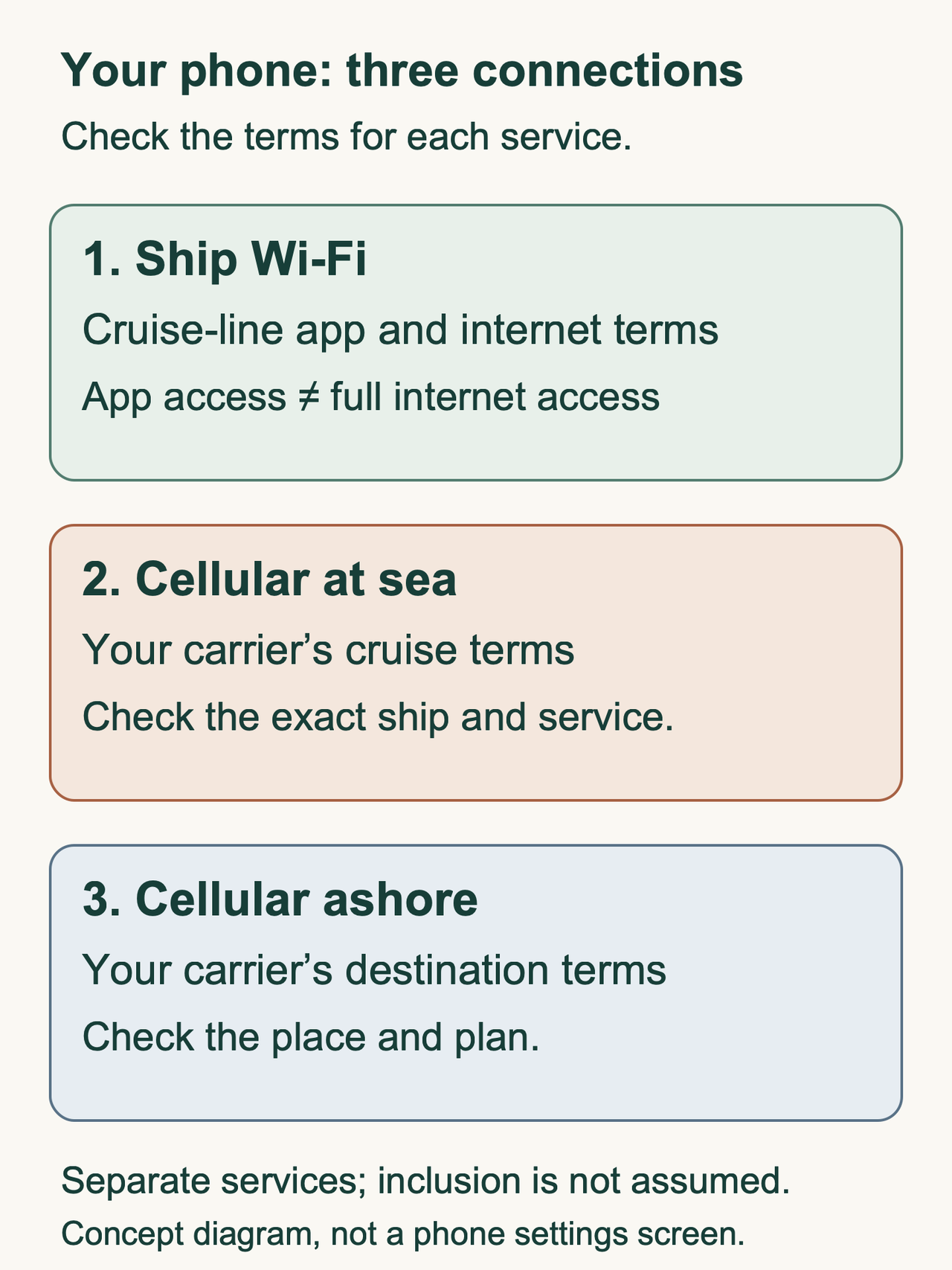
A ship Wi-Fi package and cellular-at-sea service are separate connection choices. Royal Caribbean says its cellular-at-sea roaming rates are set by the guest’s mobile provider and describes VOOM Wi-Fi as another option. For airplane-mode and roaming setup steps, see using your phone on a cruise. This guide focuses on comparing and buying an onboard Wi-Fi plan.
Sources [2]
Common questions
Which cruise Wi-Fi plan do I need for email?
Choose a tier whose current service list includes email. Carnival lists email and browsing with Value; its Social plan excludes email. These are Carnival’s current descriptions, not universal tier names.
Sources [1]
Can I stream on a cruise ship?
It depends on the operator, plan and coverage. Carnival lists streaming apps on Premium where coverage allows, and says satellite speed may vary by location and time. Downloading content before sailing avoids relying on the ship connection for playback.
Sources [1]
Can I switch one plan between a phone and tablet?
Carnival says multiple devices may be used with a plan, but only one can connect at a time. Verify the switching instructions and whether the offer is restricted by guest or login in your booking.
Sources [1]
Does cruise Wi-Fi support my VPN?
Carnival says VPN connections are unsupported on its service. Other operators can differ; confirm your line’s current terms and any employer requirements before purchase.
Sources [1]
Sources and scope
Check the current terms for your ship, sailing and booking. This guide combines published source material with planning suggestions; it does not claim firsthand travel experience.
- Internet Plans | Wi-Fi Plans & PricesSource checked 2026-10-21.
Carnival’s live official page describes Social, Value and Premium features, one device at a time, switching among multiple devices per plan, satellite speed variability, unsupported VPN, pre-purchase timing, onboard daily plans, and no refund after onboard activation. No prices are repeated.
- Will my phone work onboard a cruise ship?Source checked 2026-10-21.
Royal Caribbean says its ships provide cellular-at-sea connectivity, roaming rates are determined by the guest’s cellular provider, and VOOM Wi-Fi is another connection option. Royal Caribbean-specific example.